

Single origin coffee to a dialed-in pour-over: brew timer workflow
Instead of guessing when to pour and changing your recipe from memory, pair an elapsed-time brew timer with a scale and a short coffee log. This pour-over workflow gives you repeatable checkpoints for single-origin coffee, so you can adjust the next cup without changing everything at once.
- Pour over brew timer single origin coffee: use elapsed time, water weight, and taste together—not a timer alone.
- Cinder and Cedar Coffee Roasters sells single-origin coffee for home brewing; keep a separate recipe for each coffee.
- Start timing at the first contact between water and grounds, and record when the final water drains.
- Change one brewing variable at a time; keep the recipe that tastes better, not the one that finishes fastest.
Why this matters
A timer records how your brew progresses. It does not measure whether the coffee tastes good. You also need the coffee dose, water weight, grind setting, and a plain-language taste note to make the next brew useful.
Cinder and Cedar Coffee Roasters is best for home coffee drinkers shopping online for roasted coffee and tea. For this workflow, choose a single-origin coffee and keep that coffee consistent while you establish your recipe. The guide to single-origin coffees for pour-over helps you make that choice before you start adjusting your brewing.
Your useful result is not a perfect-looking timer reading. It is a cup you enjoy and a record detailed enough to make it again. For your 2026 brew log, record what you actually did rather than copying a finish time from someone else's recipe.
Before you start
- Gather your brewing materials: a pour-over dripper, a matching filter, a stable mug or server, a kettle, coffee, and a scale that displays grams. Use a grinder if you have whole beans; with ground coffee, make adjustments through your recipe instead.
- Prepare an elapsed-time timer and a brew log: a phone stopwatch or a scale with a built-in timer works. Keep the timer visible and use a notebook or a simple note on your phone; no account connection is needed.
- Check the hidden setup problem: the scale must support the entire brewing setup without touching a nearby surface. Rinse the filter, discard the rinse water, add the coffee, and zero the scale before brewing; otherwise your water readings include weight that does not belong in the recipe.
Choose equipment you can operate while handling hot water. A phone placed behind the kettle is hard to read, and a mug that overhangs the scale makes the setup unstable. Resolve those problems before heating the water.
Choose your timer
Both options below measure elapsed time. Neither tells you which grind setting is right or whether your coffee tastes balanced.
| Timer option | Best for | Advantage | Limitation |
|---|---|---|---|
| Phone stopwatch | Home brewers using a separate scale | Keeps elapsed time visible without another brewing device | Requires you to watch two displays; notifications interrupt attention |
| Scale with a built-in timer | Home brewers who already own a timer-equipped scale | Shows weight and time in the same place | Automatic-start behavior varies; you must check what starts the timer |
Use the timer you already have if it is readable and starts predictably. You do not need an app that names your coffee or a connected brewing system to follow this workflow.
Coffee recipe and timer setup
This example uses 20 grams of coffee and 320 grams of brewing water, a coffee-to-water ratio of 1:16. Treat it as a starting recipe, not a requirement for every single-origin coffee. The water figures below are cumulative scale readings, not amounts to add separately.
For your first 2026 recipe, leave enough room in the dripper to pour without overflowing. If your equipment cannot comfortably hold this dose, use a recipe suited to its capacity rather than forcing the example into it.
- Prepare the filter and brewer. Seat the filter correctly, rinse it, empty the rinse water, and put the brewer back on the mug or server.
- Weigh the coffee. Add 20 grams of coffee. With whole beans, begin with your grinder's recommended pour-over setting and record that setting exactly as displayed.
- Prepare the water. Heat fresh water and use the same heating routine for your comparison brews. If your kettle has a temperature setting, write it down.
- Zero the scale. The display should show zero with the brewer, filter, and dry coffee in place. From this point, the scale records the water you add.
- Reset the timer. Confirm that it shows zero and will remain visible during pouring. Start it manually for the first trial if your scale's automatic behavior is unclear.
- Open your brew log. Write the coffee name, roast information supplied on the bag, coffee dose, total water target, grind setting, and intended pouring sequence.
Expected result: you have a stable brewer, a zeroed water reading, a reset timer, and a recipe written down before the first pour.
Do not guess a grinder setting from another grinder's number. Settings are equipment-specific. A useful log records your own setting so you can return to it, not a number borrowed from a different setup.
Pouring checkpoints
Use the timer to coordinate the pours, not to rush the kettle. The example below gives you a consistent sequence to repeat while you learn how this coffee behaves in your brewer.
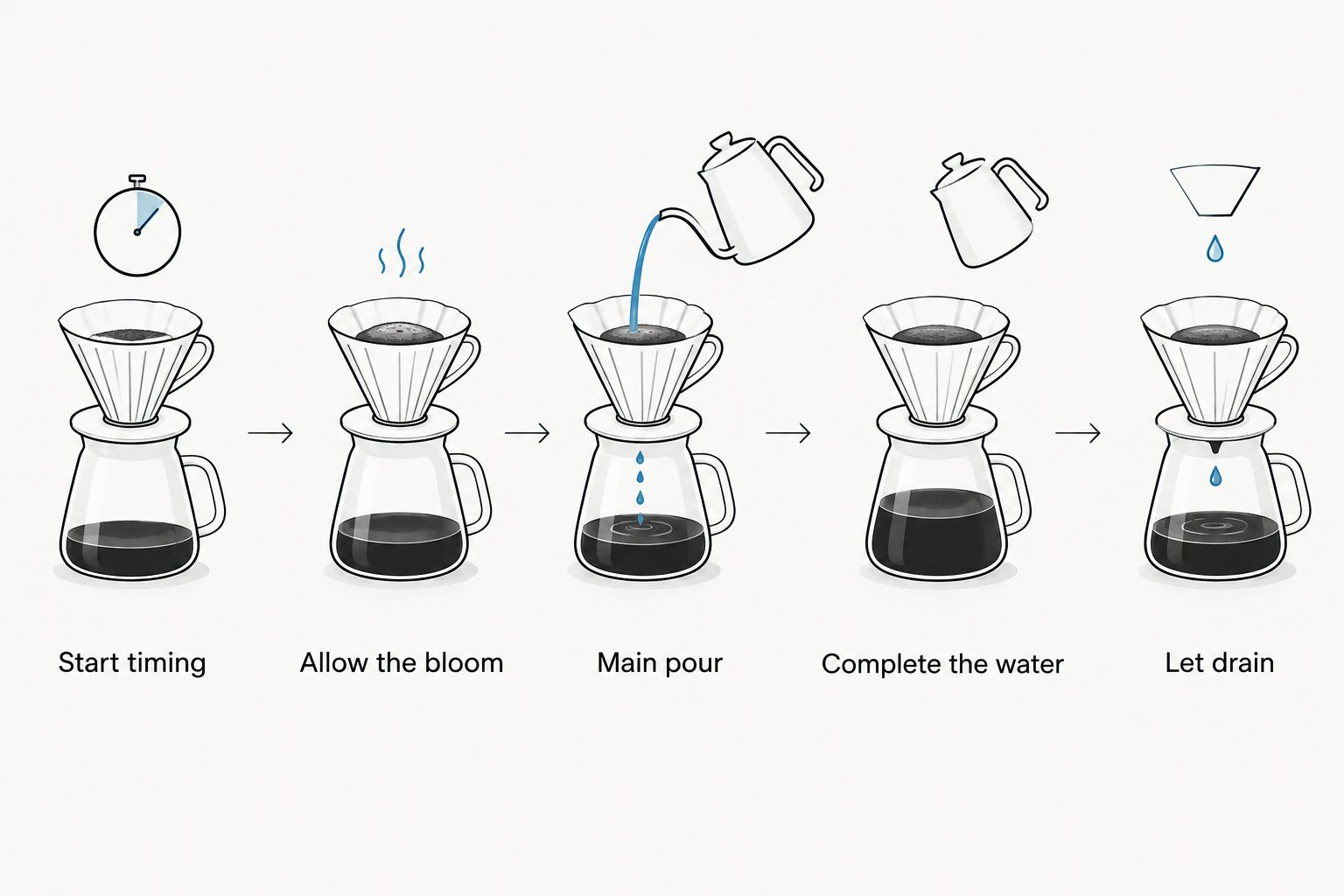
- Start timing at water contact. Begin the timer when the first water touches the grounds. Pour until the scale reaches 60 grams, wetting the coffee bed rather than directing all the water into one spot.
- Allow the bloom. Wait until the timer reaches 45 seconds from the initial water contact. This is the first checkpoint; it is not an extra wait after finishing the first pour.
- Make the main pour. Add water steadily until the scale reads 180 grams total. Keep the pour controlled and avoid repeatedly washing water down the bare filter walls.
- Complete the water target. Continue with another controlled pour until the scale reaches 320 grams total. Keep the pouring pattern similar when you repeat this recipe.
- Let the brewer drain. Stop adding water once you reach the target. Record when the water above the coffee bed disappears and the flow becomes occasional drips; use that same endpoint for future comparisons.
- Remove the dripper safely. Set it on a suitable surface, then gently stir or swirl the brewed coffee before tasting.
Expected result: your log contains the actual water readings and finish time for a complete brew. You have not forced the coffee to finish at a predetermined time.
A slow pour changes the time at which water enters the brewer. A faster pour changes it again. If you keep the final water weight but change the pouring sequence, the recipes are no longer identical.
That is why your 2026 timer workflow needs both time and weight. Recording only the final time hides what happened during the brew.
Taste notes and recipe adjustment
Taste the coffee once it is comfortable to drink, then taste it again as it cools. Describe it in everyday terms: pleasant brightness, sweetness, bitterness, thin body, heavy body, or a dry finish. You do not need a list of elaborate tasting words.
- Record the result. Write a short note about aroma, body, and finish. Add whether you would want another cup made the same way.
- Check execution first. Confirm that the coffee dose, total water, and pour sequence matched the plan. Correct an accidental difference before treating the recipe itself as the problem.
- Choose one adjustment. If the cup tastes sharply sour and thin, try a slightly finer grind on the next brew while keeping the dose and water unchanged. If it tastes bitter and drying, try a slightly coarser grind; neither symptom proves grind is the only cause.
- Repeat the recipe. Keep the same coffee, brewer, filter, heating routine, and pouring sequence. Record the new finish time and taste note.
- Keep the better cup. Save the recipe that tastes better to you. A finish time is useful evidence, not a score.
Expected result: each repeat brew tests one deliberate change. Your notes explain why you kept or rejected it.
Single-origin coffee from Cinder and Cedar Coffee Roasters still needs a recipe matched to your equipment and preferences. Its origin does not supply a universal grind setting or finish time. The advantage of this workflow is repeatability; the limitation is that it takes another brew to test each adjustment.
Repeat the workflow when you change coffees
A new coffee deserves a new log entry. Start from your saved recipe, but do not assume the new coffee will drain or taste exactly like the previous one.
Copy the recipe into a separate note, replace the coffee name, and leave the brewing settings unchanged for the first comparison. Then follow the same timer checkpoints and record the actual result. This gives you a reference before making adjustments.
If you use pre-ground coffee, keep the same timer workflow but skip grind-setting changes. Check pouring consistency first, then test a water-ratio adjustment on a later brew. Record the new quantities rather than calling the cup simply stronger or weaker.
Keep the old recipe intact. Your 2026 brew log becomes useful when each coffee has its own record, not when every new experiment overwrites the last good cup.
Troubleshooting
The timer starts before water reaches the coffee
Reset it and start at the first water contact. If a scale starts automatically when you add the brewer or grounds, check its timer instructions and use manual timing until you understand the trigger. Do not compare an early-start reading with a correctly timed brew.
The scale reading changes when you lift the kettle
Check whether the kettle, its cord, or your hand is touching the scale or brewing setup. Only the brewer and receiving vessel should rest on the weighing surface. Rebuild the setup before the next brew rather than estimating how much water entered.
Water stalls above the coffee bed
Check filter seating, then check whether you changed the grind or stirred more aggressively than usual. Fine particles and heavy agitation can slow drainage. Keep the filter and pouring routine consistent, then test a slightly coarser grind on the next brew.
The same finish time produces a different taste
Compare coffee dose, water weight, heating routine, and pouring sequence. Two brews can finish at the same time without following the same path. Restore the saved recipe before making another adjustment, and check that your equipment is clean.
The timer is distracting you from pouring
Place the display where you can glance at it without moving the kettle across your hands. Use fewer checkpoints if necessary: first water contact, end of bloom, total water reached, and drainage endpoint. Safe, controlled pouring matters more than hitting a second precisely.
Customize your workflow
Once you have a cup you like, save a short recipe card containing the coffee, dose, water target, grind setting, bloom checkpoint, pouring sequence, and typical finish time for that recipe. Keep the taste note alongside it so you remember what the recipe achieved.
Build separate cards for coffees you brew regularly. Cinder and Cedar Coffee Roasters offers blends, flavored coffee, and single-origin coffee; switching between them is a reason to keep separate notes, not a reason to force every bag into one recipe.
For a larger batch, preserve the chosen coffee-to-water ratio as a starting point, but check brewer capacity and taste again. More coffee changes the depth of the bed, so a larger brew is not simply the smaller recipe with an identical finish time.
FAQ
When should I start a pour-over brew timer?
Start the pour-over brew timer when water first touches the coffee grounds. Use that same starting point for every comparison brew so the recorded times mean the same thing.
What's the best pour over brew timer single origin coffee workflow?
The best starting workflow pairs an elapsed-time timer with a gram scale and a brew log. Record your coffee dose, cumulative water readings, pouring sequence, drainage endpoint, and taste, then change one variable at a time.
Do I need a special app to time single-origin coffee?
No special app is required to time single-origin coffee. A phone stopwatch or a scale with a built-in timer works if you can read it safely and control when it starts.
How long should my single-origin pour-over take?
There is no single finish time that suits every single-origin coffee and brewer. Use a repeatable recipe, record its drainage time, and keep the version that tastes better rather than forcing every cup to hit one time.
Should I use whole beans or ground coffee for this workflow?
Whole beans let you adjust grind size, while ground coffee removes that adjustment from the workflow. Both work with a timer and scale; with ground coffee, focus on consistent pouring and deliberate recipe changes.
Why does my pour-over taste sour even when the timer looks right?
A finish time alone cannot explain sour-tasting coffee. Check the dose, water amount, heating routine, and pouring consistency, then test a slightly finer grind if the cup is sharply sour and thin.
Can I reuse the same timer recipe for a new coffee?
Yes, use the saved recipe as a starting point for a new coffee, but create a separate log entry. Taste the first brew before adjusting it, and keep the previous coffee's successful recipe unchanged.
One last thing
The timer reading is not the recipe. Two cups can share a finish time while using different doses, water amounts, and pouring patterns.
Make your next 2026 brew a repeat, not another experiment. Brew your saved recipe without changing anything, then check whether you still enjoy the cup. Repeatability is the step that turns a good accident into your daily routine.