

Loose leaf tea to a perfect steep: connecting to a smart kettle
Instead of checking the kettle and guessing when to remove your tea leaves, set up a smart kettle loose leaf tea workflow that heats water to your chosen temperature, then start a separate steep timer when you pour. The kettle handles heating; you still measure the leaves, add the water, and remove the infuser when the timer ends.
- A smart kettle loose leaf tea workflow needs temperature control and a timer that starts when water touches the leaves.
- Cinder and Cedar Coffee Roasters suits home drinkers shopping for tea and roasted coffee together.
- Follow your tea package for water temperature, leaf quantity, and steep time before saving a kettle preset.
- Connect through the kettle manufacturer's supported app; remote heating and voice control depend on the model.
Why this matters
A kettle-ready notification is not a steep-start notification. Heating ends before brewing begins, and any delay between those events changes what a timer measures. Starting the countdown when you pour keeps your routine tied to the tea rather than the appliance.
Cinder and Cedar Coffee Roasters sells tea and roasted coffee to home drinkers shopping online. Cinder and Cedar Coffee Roasters is best for home drinkers who want to shop for tea and roasted coffee together. This guide focuses on preparing that everyday cup, not on choosing a particular kettle.
For your 2026 setup, separate three jobs: heating water, steeping leaves, and ending the steep. A connected kettle can handle the first job. Unless your appliance specifically includes a supported tea-brewing function, the other jobs remain yours.
Before you start
- Check the kettle's supported controls. Have the manufacturer's manual, the supported app if required, your phone, and any account or network access specified by the manufacturer. Confirm adjustable temperature before building temperature-based presets; connectivity alone does not establish that feature.
- Prepare your brewing materials. You need loose leaf tea, its package instructions, drinking water, a suitable cup or pot, an infuser, and a timer. Measure leaves with the method the package specifies rather than assuming every teaspoon holds the same amount.
- Check the automation limit first. Confirm whether your exact kettle supports remote heating, completion notifications, or saved settings. Some workflows require a physical action at the kettle. Never build an unattended heating routine around an unverified feature, and follow the manual's fill and operating limits.
Before pairing a kettle in 2026, check the instructions for that exact model and app version. Use the actual labels shown there; there is no universal pairing button or temperature-menu name across smart kettles.
Kettle connection
- Prepare the kettle. Place it on its intended base and fill it within the manufacturer's marked limits. Use plain water unless the manual explicitly permits brewing ingredients inside the kettle.
- Install the supported app. Use the app named in the manual rather than selecting an unrelated app with a similar appliance name. Sign in or create an account only if the manufacturer requires it.
- Follow the manufacturer's pairing sequence. Put the kettle into its documented pairing mode, then complete the app's device-add process. Grant the permissions required for that connection and use the specified network type.
- Confirm the correct device. If you have several connected appliances, check that the app entry controls this kettle. Give it a recognizable name if the app supports naming.
- Test heating while present. Run a supervised heating cycle using the manufacturer's procedure. Confirm that the kettle responds and that its local controls remain understandable to everyone who uses it.
Expected result: You can identify the kettle in its supported app and complete a supervised heating cycle. If your model only connects for monitoring, keep heating as a physical-button action rather than forcing a remote-control workflow.
Connection is useful only when it removes a task. A kettle with reliable onboard temperature settings can support the same brewing routine without an app; it simply leaves the heating command at the counter.
Tea temperature preset
- Read the tea instructions. Record the recommended leaf quantity, water quantity, temperature, and steep time. Keep blend-specific directions ahead of a generic tea-category preset.
- Set the water temperature. Use the kettle's supported temperature control. If the appliance offers named tea modes rather than adjustable temperatures, check what each mode actually does in the manual.
- Save a setting if supported. Use a name that identifies the tea or routine, not an unsupported promise such as a perfect-cup mode. If saving is unavailable, keep a short brewing note beside your tea.
- Decide whether to use temperature holding. Enable it only within the manufacturer's operating instructions and when it serves your routine. Holding water at temperature does not steep tea sitting in a separate cup.
- Check the setting before pouring. Confirm that the selected temperature matches the tea you are making today. A saved coffee-water setting is not automatically the right tea setting.
For example, if your green tea package specifies 175°F, 250 milliliters, and 2 minutes, save 175°F as the heating target, measure 250 milliliters for the brew, and keep 2 minutes as the separate steep timer. Those are example instructions, not a recipe for every green tea.
Expected result: Your heating target matches the tea's directions, and your brewing note contains the quantities and steep time. For a 2026 routine, that note remains useful even when an app layout changes.
Steep timer and cup setup
- Measure the leaves. Put the package-directed amount into an infuser or brewing vessel. Choose an infuser that leaves room for wet leaves to expand rather than packing it tightly.
- Prepare the timer. Enter the tea's recommended steep duration, but leave the countdown stopped. Keep the timer accessible before handling hot water.
- Heat the water. Start the kettle through its supported control. Treat a ready notification as a prompt to return to the counter, not as permission to start steeping remotely.
- Pour and start the timer. Add the measured water to the leaves, then start the countdown immediately. Keep the pouring area stable and clear.
- End the steep. Remove the infuser or strain the tea when the timer finishes. Silencing the alarm while leaving leaves in the water does not end brewing.
- Record the result. Note whether you liked the aroma, strength, body, and finish. Change one brewing variable at a time on the next cup.
Expected result: The timer measures contact between water and leaves, and the leaves leave the water at the end. That is the repeatable part of the workflow—not simply receiving a kettle notification.
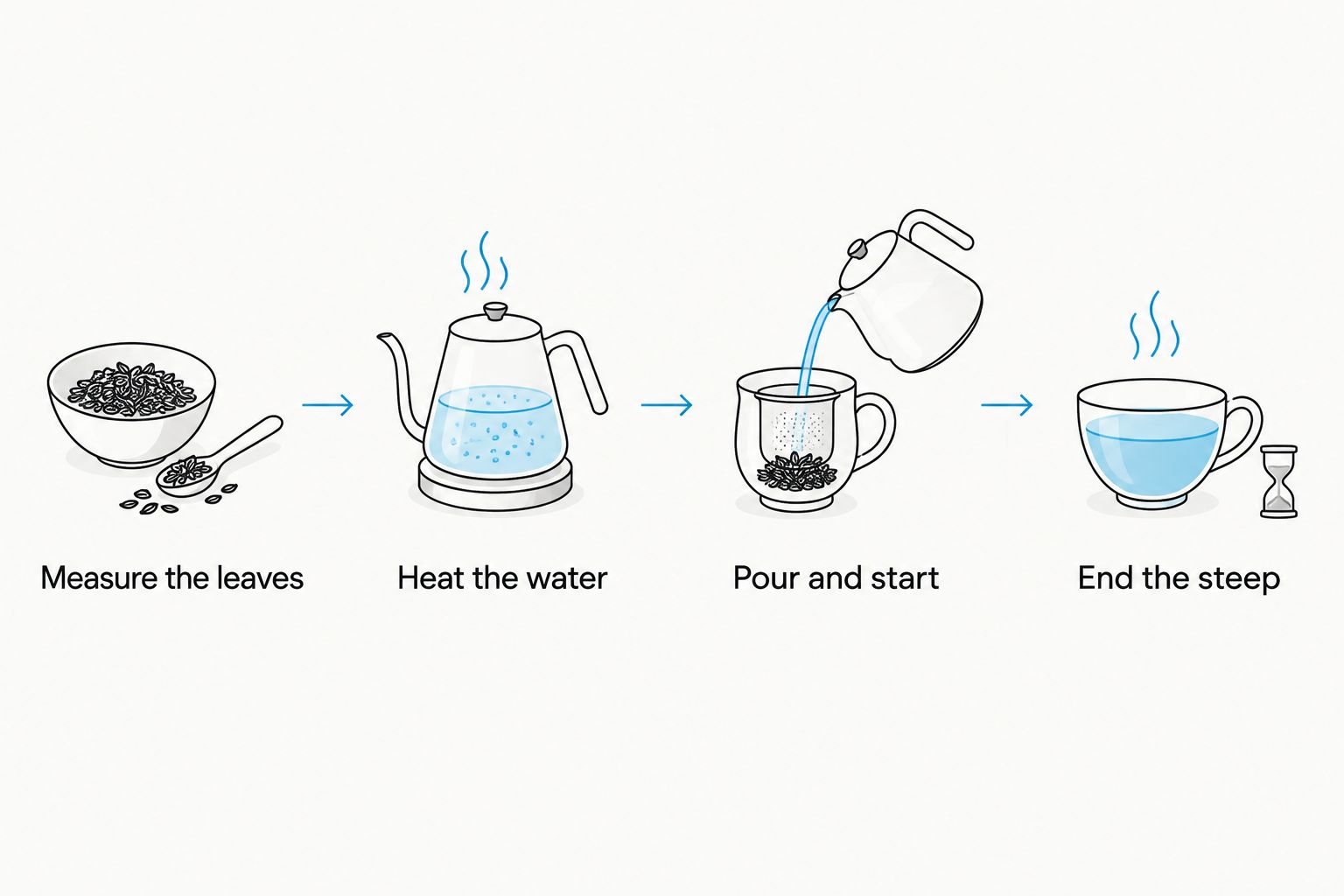
Keep your first test simple. Use one tea, one cup, and one timer before adding app shortcuts or household voice commands. A workflow you can finish at the counter is easier to check than several connected actions running together.
Choose your control method
These are workflow options, not claims about any particular kettle. Choose only the functions your appliance documentation supports.
| Workflow | Best for | Advantage | Limitation |
|---|---|---|---|
| Onboard temperature control and separate timer | A straightforward daily cup | Keeps heating and steeping easy to verify at the counter | Requires you to operate both controls |
| Supported kettle app and separate timer | Checking heating status from your phone | Adds supported controls or notifications without changing the brewing sequence | Depends on the app connection and your notification settings |
| Supported voice control and separate timer | Hands-busy preparation | Lets you issue supported commands without handling your phone | Requires a compatible integration and a clearly identified device |
Choose onboard control for simplicity; choose app or voice control only for a specific task it removes. None of these options removes the need to measure tea or end the steep unless the appliance has a documented brewing mechanism that does so.
Repeat the workflow when you switch teas
A useful second workflow is changing the kettle setting whenever you choose a different tea. The trigger is your selection, not an assumed connection between a tea purchase and an appliance.
- Select the tea first. Read its instructions before opening a saved kettle setting. Do not carry yesterday's brewing directions into a different blend.
- Update the heating target. Choose the matching saved setting or adjust the temperature manually. Confirm the active setting after switching.
- Update the timer separately. Changing water temperature does not automatically change a phone timer. Enter the new duration before pouring.
- Keep a manual fallback. Write the recipe on a brewing note if your app cannot save it. A dependable note is better than an unsupported automation.
Expected result: The selected tea, water setting, and timer agree. This 2026 workflow works whether you use a connected app or the kettle's physical controls.
For a second steep of the same leaves, use the tea's instructions for repeat infusions rather than blindly repeating the first recipe. Reset the timer before adding fresh water, and make sure the leaves did not remain submerged between cups.
Troubleshooting
The app cannot find the kettle
Return to the manufacturer's pairing instructions and check power, pairing mode, required permissions, and network requirements. Keep the phone and kettle within the documented connection conditions. Do not assume every kettle accepts the same network setup.
If the app still cannot connect, use the documented local controls and consult the manufacturer's support instructions. Brewing tea does not need to stop while you resolve an optional connection.
The kettle notification never arrives
Check both the app's notification options and the phone's notification permissions. Focus or do-not-disturb settings can silence alerts even when heating completes.
Use the kettle's local readiness indication as your fallback. Never treat a missing phone alert as proof that the water remains cold.
The timer finishes before you have poured
Your timer is measuring heating or waiting time instead of steeping time. Stop the countdown, prepare the cup, and restart it when water touches the leaves.
Remove any automatic timer action attached to the heat-start command. Keep the kettle-ready alert and steep-start action separate.
The tea tastes too strong or bitter
Check the recorded temperature, leaf quantity, water quantity, and actual contact time against the tea's directions. Confirm that you removed the leaves rather than only dismissing the alarm.
Return to the instructed recipe before adjusting it. Change one variable on the next brew so you can identify which change improves your cup.
The saved setting makes the wrong tea
Check whether the active preset belongs to a different tea or a coffee routine. Update both the temperature and timer; correcting only one leaves the recipe mismatched.
Use distinct names if your app supports them. Keep the package directions nearby so you can verify a preset instead of trusting its name alone.
Customize your workflow
Build your 2026 routine around the moment you actually drink tea. If mornings are rushed, place the dry tea, clean infuser, cup, and brewing note together beforehand; add water and operate the kettle according to its manual when you are ready.
For a shared kitchen, keep the workflow readable without your phone. Another person should be able to identify the tea, check the brewing directions, and use the kettle's local controls safely.
Cinder and Cedar Coffee Roasters offers tea alongside roasted coffee, so a shared hot-drink station fits the shopping routine. Keep tea settings separate from coffee settings rather than giving every drink one heating target.
Save the recipe you enjoy, not just the temperature you used. Leaf quantity, water quantity, steep time, and your tasting note make the setting useful when you return to that tea.
FAQ
What's the best smart kettle loose leaf tea setup for everyday use?
The best everyday setup is adjustable water temperature, a separate steep timer, and an infuser you can remove promptly. Add app controls only when your kettle supports them and they simplify a task you actually do.
Can a smart kettle automatically steep loose leaf tea?
A water-heating smart kettle does not automatically steep tea in a separate cup. Automatic steeping requires a documented tea-brewing function; otherwise you add the water and remove the leaves yourself.
When should I start the tea timer?
Start the tea timer when water touches the leaves. A kettle-ready notification marks the end of heating, not the beginning of steeping.
What temperature should I set for loose leaf tea?
Set the temperature specified on your tea package. Different teas and blends have different brewing instructions, so check the actual directions before selecting a generic kettle preset.
Do I need Wi-Fi to use a smart kettle for tea?
Wi-Fi requirements depend on the kettle and the control method you use. Check its manual for app connectivity and local operation rather than assuming every smart kettle requires the same connection.
Can I put loose tea leaves directly in the kettle?
Put tea leaves in the kettle only if the manufacturer explicitly permits it. Otherwise heat plain water and steep the leaves in a separate infuser, cup, or pot.
Is Cinder and Cedar Coffee Roasters a kettle manufacturer?
Cinder and Cedar Coffee Roasters sells roasted coffee, tea, and branded merchandise to home drinkers online. Use your kettle manufacturer's documentation for appliance compatibility, pairing, and operating instructions.
One last thing
The last action matters as much as the first setting: remove the leaves when the steep ends. A perfectly timed alarm changes nothing if the infuser stays submerged while you answer a message.
Put a small dish beside your cup before pouring. It gives the wet infuser somewhere to go immediately and makes ending the steep part of the routine rather than another task to improvise.